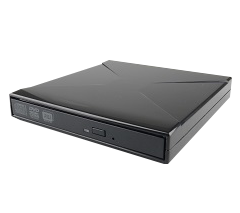
DIGISTOR External DVD Recorder, Tray Loading, USB 2.0
Overview
- 8X DVD/ 24x CD Write & Read
- USB 2.0 Y-cable bus-powered
Lightweight and Slim
DIGISTOR’s slim external DVD Reader / Writer is the best way to watch your DVD movies, listen to your CD music on the go or for any of your CD or DVD writing applications. Its lightweight, slim, and portable design makes it one of the most portable DVD drives to carry around anywhere!
Read Speed
- DVD-ROM SL/DL: 8x
- DVD-R SL/DL: 8x
- DVD+R SL/DL: 8x
- DVD-RW/DVD+RW: 8x
- DVD-RAM: 8x
- CD-R/CD-RW/CD-ROM: 24x
Write Speed
- DVD-R/DVD+R: 8x
- DVD-R DL/DVVD+R DL: 6x
- DVD-RW/DVD+RW: 6x
- DVD-RAM: 5x
- CD-R: 24x
- CD-RW: 4x
Technical Specifications
Part Number:
DIG-72032
Product Name:
DIGISTOR External DVD Recorder, Tray Loading, USB 2.0
Technical Specifications
Part Number:
DIG-72032
Product Name:
DIGISTOR External DVD Recorder, Tray Loading, USB 2.0
Operating system compatibility:
Windows 10 and 11
macOS 11 “Big Sur” or newer
Red Hat Enterprise Linux and Ubuntu LTS
macOS 11 “Big Sur” or newer
Red Hat Enterprise Linux and Ubuntu LTS
Dimensions:
6.73" x 5.43" x 0.91" (171mm x 138mm x 23mm)
Compliance:
FCC, UL, CE, RoHS, TAA
Warranty:
CDSG provides a 2-year limited warranty for this product.
Technical Support:
Your investment in CDSG products is backed up by our free technical support for the lifetime of the product. If you need to contact us for any reason, visit digistor.com/support.
Technical Support
Your investment in DIGISTOR products is backed up by our free technical support for the lifetime of the product. If you need to contact us for any reason, visit digistor.com/support
Need help? Talk with our sales team.
We’re here to help you find the right secure data storage solution.